DoodlePilot · desktop work companion

A small pilot for everyday office work.

DoodlePilot is a desktop work buddy for the daily things that otherwise scatter everywhere: project cards, today's tasks, a next-day rollover that archives today and carries unfinished work forward, alarms, and screenshot translation through API-connected multimodal models.

Task board daily archive reminders paper-plane alert screenshot translation
Demo 01

Manage project cards and keep the day's work in one desktop companion.

An office companion that stays close to the day.

DoodlePilot is built around a practical feeling: everyday work needs a small companion more than another heavy management system. It keeps project cards, daily tasks, reminders, and translation utilities in the same desktop space, so small obligations do not disappear between apps.

The project is personal and local-first. A task can move through the day, a reminder can interrupt at the right moment, and completed or unfinished work can be archived into history instead of becoming a pile of loose notes.

DoodlePilot is the office buddy that keeps the board, the day, the alarm, and the translation tool within reach.

Tasks, reminders, and translation in one loop.

The app is organized around the rhythm of ordinary desk work. Plan the project board, decide what matters today, use “Open next day” to archive today's record and carry unfinished tasks forward, and turn to API-connected models when a screenshot needs to be translated without losing structure.

01

Project board

Cards, lanes, fields, resizing, and reordering keep ongoing projects visible without forcing a rigid workflow.

02

Daily archive

Opening the next day archives today's record and carries unfinished tasks forward; archived days remain available in history.

03

Reminder pilot

Alarms can repeat, warn in advance, and send a small paper-plane nudge across the desktop when it is time.

04

Screenshot translation

Through an API-connected multimodal model, selected screen regions can be translated while preserving complex formula layout.
Five everyday workflows.

The demos show DoodlePilot as a compact desktop companion: a project manager, an alarm tool, a model setup surface, and a screenshot translation workflow for structured technical content.

01

Manage the project board

Use project lanes and task cards to keep current work visible, organized, and close to the rest of the desktop workflow.

02

Set a reminder that can actually interrupt

DoodlePilot supports reminder times, advance notices, repeated nudges, and the little flying-plane alert that crosses the desktop when the reminder fires.

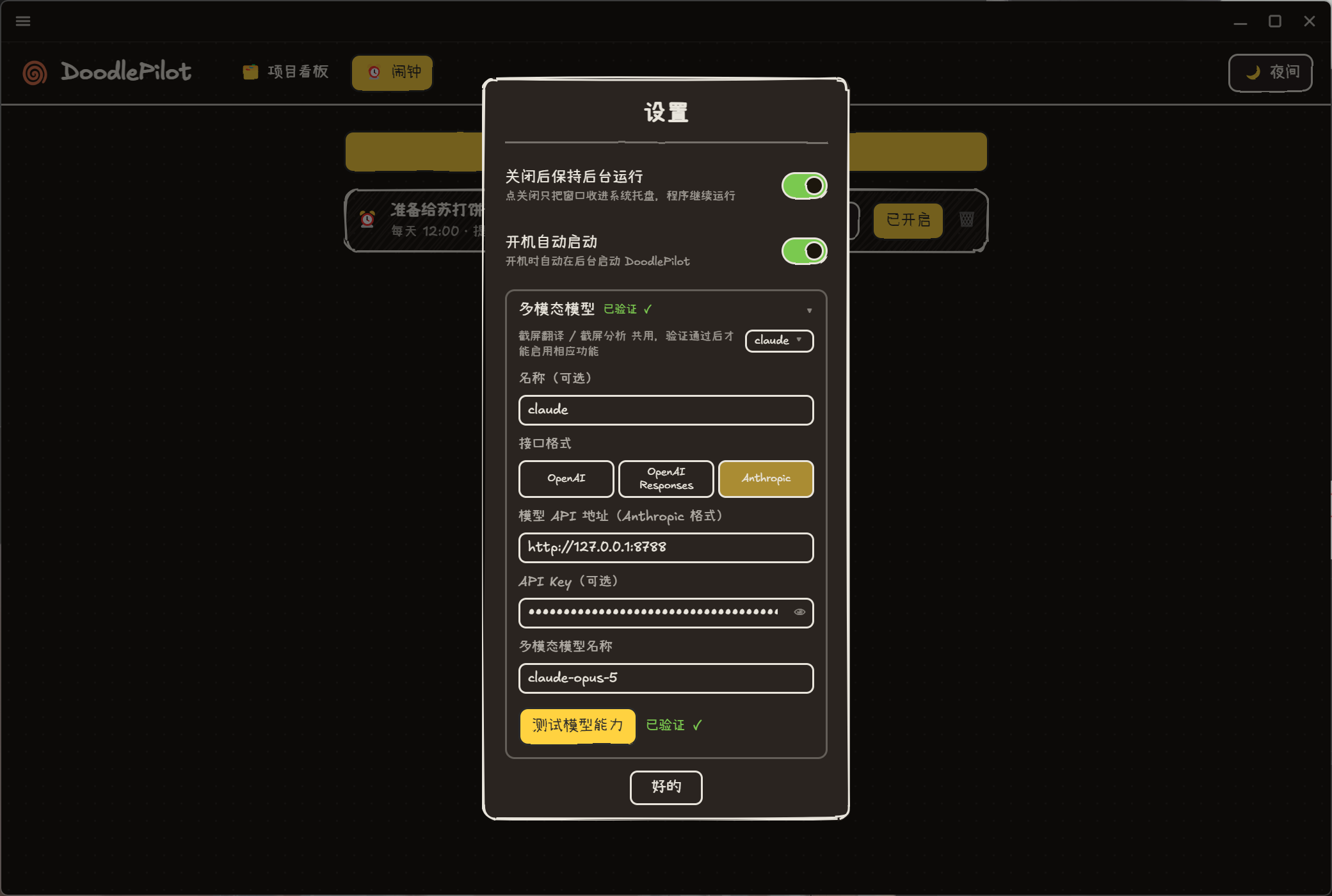
DoodlePilot multimodal model setup panel for screenshot translation
03

Connect a multimodal model by API

The screenshot translation feature can be wired to a model endpoint and key, then tested before the shortcut becomes part of the daily workflow.

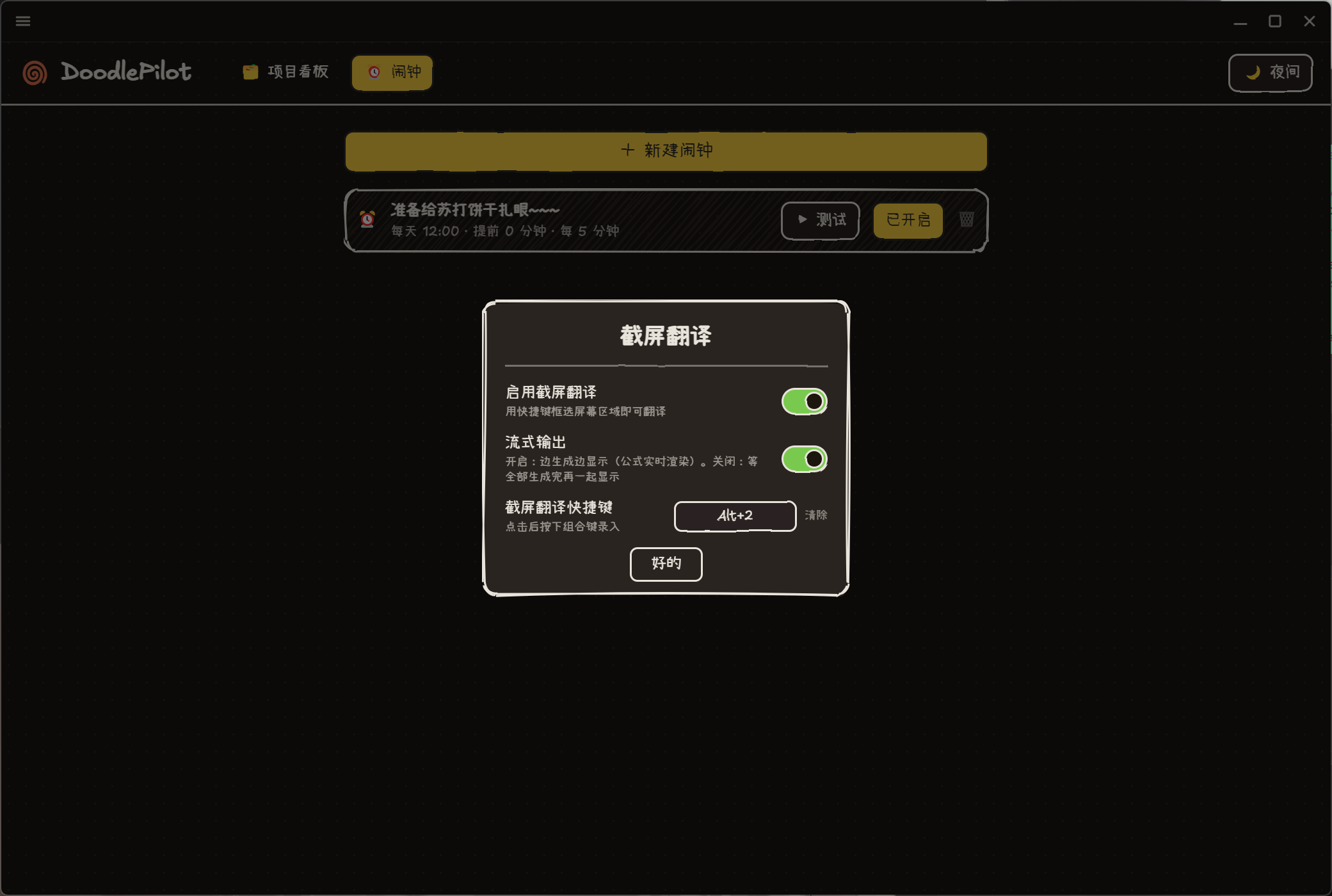
DoodlePilot screenshot translation settings panel
04

Turn on screenshot translation

Configure the shortcut, streaming behavior, and API-backed translation path for selecting a region of the screen and translating what is inside it.

05

Translate formulas without flattening the page

Even when the screenshot contains dense technical notation, DoodlePilot aims to keep the original structure readable while translating the surrounding text.

An Electron desktop companion with local data.

DoodlePilot is built with Electron, Vite, React, TypeScript, Zustand, Tailwind CSS, framer-motion, PixiJS, Rough.js, and sql.js. The app stores its working state locally in SQLite, making the board, daily history, and reminder data part of the user's desktop environment.

The project also includes a typed query, command, event, and hook contract, which makes the desktop companion easier to extend as new personal workflows appear.

A personal office buddy, still growing.

DoodlePilot is an actively developed personal tool for planning work, remembering tasks, and turning API-connected model features into everyday desktop utilities.